Connect external tools (MCP)
Turn on Kard’s MCP server so external AI coding tools can read and act on your Kards over a local connection. This is an optional, power-user feature, and it’s off by default — nothing listens for a connection until you switch it on.
What the MCP server is
Section titled “What the MCP server is”MCP (Model Context Protocol) is a standard way for AI tools to call into other software. When you enable Kard’s MCP server, external AI coding tools can connect to Kard and work with your Kards — reading them, and (if you allow it) creating or editing them — without you copying text back and forth.
It runs inside the editor as a small local server. Two things to know up front:
- It’s optional and off by default. Kard works fully without it; you only turn it on if you want an external AI tool to reach your Kards.
- It’s local only. The server listens on your own machine (
127.0.0.1) and never on your network. See The safety model below.
Turn it on
Section titled “Turn it on”You enable the server from Kard’s in-plugin Settings panel.
- Open Kard’s Settings (or press Ctrl+,).
- Go to the AI section and choose MCP Server.
- Switch Enable MCP server on.
The status card at the top of the page turns green and shows the local address the server is listening on (by default http://127.0.0.1:30050/mcp).
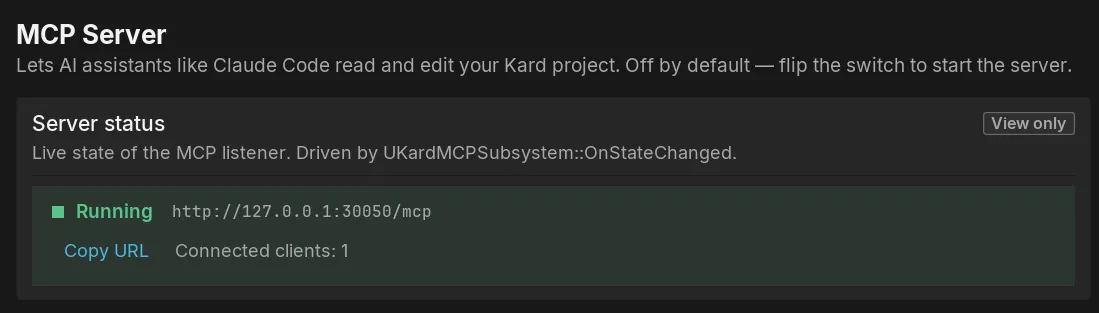
The settings page also gives you a Copy URL button and a one-click button to copy a ready-made config snippet for connecting an external AI coding tool. Paste that snippet into your tool’s MCP configuration.
What it exposes
Section titled “What it exposes”Once the server is on, your AI tool sees a set of kard.* tools — actions it can take against your project, such as listing Kards, reading a Kard, searching, and (when you allow it) creating, updating, moving, or deleting Kards. It can also surface each Kard as a resource the tool can browse.
You control what’s allowed, per action, with two default tiers:
- Reads are on by default — listing and reading your Kards.
- Writes are off by default — creating, updating, moving, or deleting Kards is opt-in. You turn each one on yourself.
This means a freshly enabled server lets a tool look at your Kards but not change them until you say so.
The safety model
Section titled “The safety model”The MCP server is designed so you stay in control. The protections are layered:
- Local only (loopback). The server binds to
127.0.0.1and never to your LAN. Only software running on your own machine can reach it; it is not exposed to your network. This is the core of the security model — don’t tunnel or forward the port to make it reachable from elsewhere. - Only runs while you’re running it. The server exists only while the Unreal Editor is open and the toggle is on. Close the editor or switch it off and the connection is gone.
- Writes off by default. As above, an external tool can read your Kards but can’t change them until you enable a write action.
- Every AI change is attributed. When a connected tool makes a change, Kard records which agent made it alongside your identity, so a teammate reviewing the Kard’s history and your project’s Activity feed can always tell a change came through an AI tool. The tool chooses which agent is acting — it can never impersonate a different person.
Because anything on your machine that can reach 127.0.0.1 can talk to the server while it’s on, treat it like any other local development service: turn it on when you want it, and off when you don’t.
Next steps
Section titled “Next steps”- KardAI assistant — the AI chat built into Kard (bring your own key).
- Settings — the full MCP settings, including the port and diagnostics options.
- FAQ & troubleshooting — data ownership, local-only storage, and fixes for common issues.